
This article is a beginner’s guide to supply chain attacks, told through real incidents that happened weeks apart in March 2026.
- Introduction
- Timeline
- What is Supply Chain Attack?
- How npm and PyPI Work Under the Hood
- Case Study 1 - The TeamPCP Campaign (March 19–27)
- Case Study 2 - Axios (March 31)
- Are These Attacks Fully Mitigated?
- Why This Is So Hard to Catch
- What You Should Actually Do
- Conclusion
- References
Introduction
March 2026 will be remembered as the month the software supply chain unraveled in slow motion and most developers didn’t notice until it was too late.
Two separate attacks played out across the month. The first was a five-stage campaign by a group called TeamPCP. They started by compromising a vulnerability scanner, stole credentials from every CI pipeline that ran it, and used those credentials to work their way through security tools, AI libraries, and communications SDKs one by one. The whole thing started from a single token that never got properly rotated. The second was a targeted hit on Axios, the most downloaded JavaScript HTTP client in existence, where an attacker took over a maintainer’s account and pushed a RAT to over 100 million weekly users. Three hours. That’s how long it was live. And they exposed a fundamental truth: the open-source ecosystem runs on trust, and that trust has an attack surface. This blog breaks down each incident in the order it happened.
Timeline
| Date | Target | Actor | Method | Impact |
|---|---|---|---|---|
| Mar 19 | Aqua Security Trivy | TeamPCP | Exploited un-revoked credentials from prior breach | Poisoned binaries, Docker images, GitHub Actions tags, CDN — credentials harvested from 1,000+ enterprise pipelines |
| Mar 20–21 | npm ecosystem (66+ packages) | TeamPCP | CanisterWorm — used stolen npm tokens to self-replicate across packages | 141 malicious artifacts published; first documented use of ICP canisters as malware C2 |
| Mar 23 | Checkmarx GitHub Actions | TeamPCP | Force-pushed malicious commits using harvested credentials | ast-github-action and kics-github-action backdoored; CI/CD secrets exfiltrated to attacker-controlled domain |
| Mar 24 | LiteLLM (PyPI) | TeamPCP | .pth file injection via stolen PyPI token from Trivy chain |
Versions 1.82.7 and 1.82.8 backdoored; AWS/GCP/Azure credentials harvested on every Python interpreter startup |
| Mar 27 | Telnyx Python SDK (PyPI) | TeamPCP | PyPI token traced back through full credential chain to Aqua Security | Versions 4.87.1 and 4.87.2 backdoored; CISA advisory issued same day |
| Mar 31 | Axios (npm) | UNC1069 (North Korea) | Compromised maintainer publishing credentials | Versions 1.14.1 and 0.30.4 delivered WAVESHAPER.V2 RAT; 183M+ weekly downloads affected for ~3 hours |
What is Supply Chain Attack?
When you write a modern application, you write maybe 10–20% of the code that actually runs. The rest comes from packages and libraries written by other developers that you pull in to handle things like HTTP requests, date formatting, cryptography, logging, and hundreds of other tasks you don’t want to implement yourself.
Those packages have their own dependencies. And those dependencies have dependencies of their own. By the time you run your application, you might be executing code from hundreds of authors you’ve never heard of, maintained by people you’ve never vetted, hosted on infrastructure you don’t control.This is called your dependency tree.
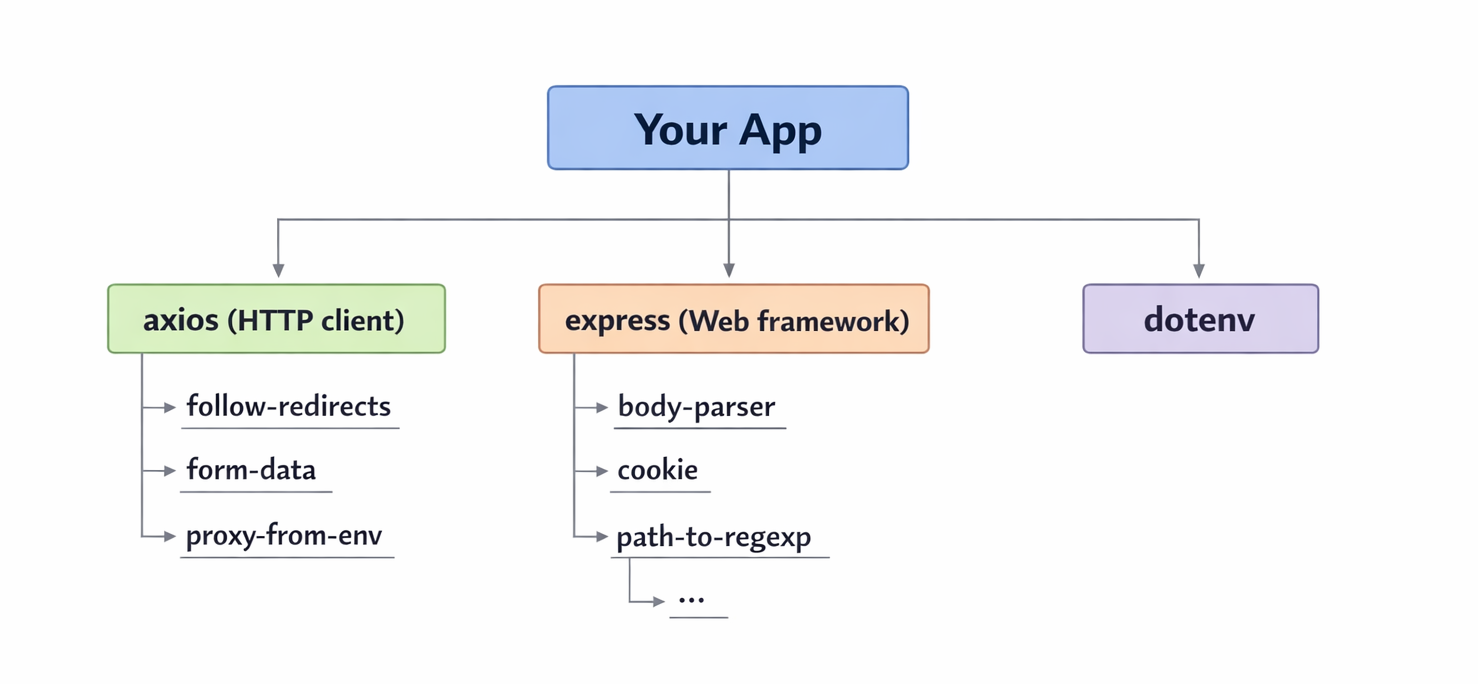
Every node in that tree is code running with the same privileges as your application. Every node is a potential entry point.
The packages you directly install are your direct dependencies. The packages they pull in are your transitive dependencies and these are the ones that catch most developers off guard. You may have never heard of plain-crypto-js. You may have no idea it’s in your project. But if axios pulls it in, it runs on your machine the moment you run npm install.
This is exactly what happened with Axios on March 31. The attack didn’t modify Axios’s own code in any meaningful way. It just added one new line to package.json:
"dependencies": {
  "follow-redirects": "^1.15.4",
  "form-data": "^4.0.0",
  "proxy-from-env": "^1.1.0",
  "plain-crypto-js": "^4.2.1"   ← this line didn't exist before
}
That single line was enough. Because when you run npm install axios, npm doesn’t just install axios. It installs everything axios needs. And plain-crypto-js@4.2.1 contained a remote access trojan.
Why are package registries a perfect attack surface?
Package registries are the central nervous system of the open-source ecosystem. They are the trusted sources where developers go to find and download the code they need. But this trust is exactly what makes them a perfect attack surface.
Anyone can create an account and publish a package. The registry doesn’t read your code, it doesn’t verify your identity beyond an email address, and it doesn’t check whether the package you’re publishing actually does what its name suggests. It just hosts whatever you upload and makes it available to the world.
The trust in the system comes from reputation - download counts, GitHub stars, maintainer history. A package with 100 million weekly downloads and years of legitimate releases is considered safe, not because anyone verified it, but because it has always been safe before, just like npm, PyPI, and Maven Central.
The real problem arises when the moment an attacker compromises a maintainer’s account, all of that accumulated trust becomes the attack vector. The package is still the same name. The same version numbering scheme. Coming from the same account. The registry has no way to distinguish a legitimate release from a malicious one, it just sees a valid token publishing a new version.
The three ways packages get malicious
By the time you finish this post, you’ll have seen all three of these in action:
Account takeover : An attacker steals a maintainer’s registry credentials and publishes a malicious version under the legitimate package name. No sophisticated intrusion, just a stolen token and a few API calls. This is what happened with Axios.
CI/CD pipeline compromise : Instead of targeting the package directly, attackers target the build system that publishes it. Get code running inside a GitHub Actions workflow, steal the publishing tokens stored as CI/CD secrets, publish whatever you want. This is the core technique behind the entire TeamPCP campaign.
Upstream compromise : It doesn’t attack the target. It attacks something the target depends on, and wait for them to npm install. This is why compromising Trivy was so valuable, it ran inside thousands of CI pipelines with broad access to secrets, and everything downstream was exposed.
The most sophisticated attacks chain all three together, which is exactly what made March 2026 unusual. It wasn’t just the scale. It was the architecture.
How npm and PyPI Work Under the Hood
To understand why supply chain attacks are so effective, you need to understand what actually happens when you run npm install or pip install. Most developers run these commands dozens of times a day without thinking about it. That’s exactly the problem.
The registry is just a file server with an API
When you run npm install axios, your package manager does three things:
- Talks to the registry (
registry.npmjs.org) and asks: “What is the latest version of axios, and where can I download it?” - Downloads a tarball, a compressed archive of the package’s files
- Extracts it into your
node_modulesfolder and runs any install scripts
That’s it. The registry is not reading your code. It is not checking whether the package is safe. It is not verifying that the person who published it is who they say they are. It is a file server that hands out whatever was uploaded under a given package name, by whoever holds the credentials for that account.
PyPI works the same way. pip install litellm fetches a tarball from pypi.org, verifies a checksum (to confirm the file wasn’t corrupted in transit), and installs it. The checksum proves the file you received matches what was uploaded. It does not prove what was uploaded is safe.
This is a critical distinction. Integrity checking confirms the file is what the registry says it is. It says nothing about whether what the registry has is malicious.
Transitive dependencies - the code you didn’t know you installed
When you add axios to your project, you’re not just installing axios. You’re installing everything axios needs to work. And everything those packages need. All the way down.
npm install axios
  └── axios@1.14.0
        ├── follow-redirects@1.15.4
        ├── form-data@4.0.0
        │     ├── asynckit@0.4.0
        │     └── combined-stream@1.0.8
        └── proxy-from-env@1.1.0
Every package in that tree runs with the same permissions as your application. You vetted axios. You probably didn’t vet asynckit. You may not have even known it existed until now.
The average Node.js application has over 1,000 transitive dependencies. The average Python ML project has even more. Most of them were written by people you’ve never heard of, are maintained by a single person with no security review process, and were last audited by nobody.
The postinstall hook - npm’s most abused feature
npm has a feature called lifecycle scripts. These are commands that run automatically at certain points during installation. The most relevant one is postinstall, a script that executes immediately after a package is installed, before you’ve even imported it in your code.
A package’s package.json can define it like this:
{
  "name": "plain-crypto-js",
  "scripts": {
    "postinstall": "node setup.js"
  }
}
The moment npm finishes extracting that package, it runs node setup.js. No prompt. No confirmation. It just runs.
This is how the Axios attack delivered its payload. The malicious plain-crypto-js package used a postinstall hook to execute a dropper the instant it was installed. By the time you saw your terminal return to a prompt, the malware had already run.
The .pth file - PyPI’s equivalent
Python has its own version of this problem. When a package is installed, Python processes any .pth files found in the site-packages directory. These files tell Python where to look for additional modules, but they can also contain executable code.
The critical difference from npm’s postinstall: a .pth file doesn’t just run at install time. It runs every time the Python interpreter starts.
This is what made the LiteLLM attack particularly dangerous. The malicious .pth file (litellm_init.pth) wasn’t a one-time install hook, it was persistent. Every python command, every pytest run, every pip install in that environment triggered the payload again. Removing the package wasn’t even enough, you had to find and delete the .pth file manually, clear your pip cache, and rotate every credential the machine had ever touched.
Why credentials are the real target
Both npm and PyPI use token-based authentication for publishing. A maintainer generates a token, stores it as a CI/CD secret, and their GitHub Actions workflow uses it to publish new versions automatically.
These tokens are:
- Long-lived - classic npm tokens don’t expire by default
- Broadly scoped - a single token can publish any package the account owns
- Stored in CI/CD environments - accessible to any code that runs in that pipeline
This is why TeamPCP spent so much effort compromising CI/CD tools like Trivy and Checkmarx before ever touching a Python package. They weren’t after the tools themselves. They were after the secrets those tools had access to inside developer pipelines, and near the top of that list was always a PyPI or npm publishing token.
Steal the token. Publish whatever you want. The registry will hand it out to everyone who installs that package, with its full accumulated trust intact.
Case Study 1 - The TeamPCP Campaign (March 19–27)
Most supply chain attacks are simple. Someone registers a typo of a popular package name and waits. TeamPCP did something different, they built a chain. Each attack fed the next one. By the time they hit LiteLLM, they’d been working toward it for five days.
How it started - Trivy (March 19)
Trivy is a vulnerability scanner. Companies run it inside their CI/CD pipelines to catch security issues in their code and container images. It’s a security tool, so it runs with access to a lot of sensitive stuff, environment variables, secrets, credentials.
TeamPCP exploited a misconfigured GitHub Actions workflow in Trivy’s repository and got access to an Aqua Security token. Aqua caught it and rotated credentials on March 1, but the rotation wasn’t clean. Some tokens were still valid.
On March 19, TeamPCP used those tokens to rewrite 76 of 77 Trivy GitHub Action release tags to point to their own malicious code. Every version of the action now ran a credential stealer. Any pipeline that pulled Trivy after this, without pinning to a specific version, silently handed over its secrets. SSH keys, npm tokens, PyPI tokens, cloud credentials. All of it encrypted and sent off to TeamPCP’s servers.
The pipeline logs looked completely normal.
The worm - CanisterWorm (March 20–21)
With a pile of npm tokens from Trivy’s victims, TeamPCP deployed something they called CanisterWorm. It’s exactly what it sounds like, a worm that spread through npm on its own.
The payload would run on an infected machine, look for npm credentials in the environment, and use them to push malicious versions of every package those credentials could publish. Those infected packages would then do the same thing to whoever installed them. Within 24 hours, 66+ packages were compromised and 141 malicious artifacts were sitting on the npm registry.
The C2 (command-and-control server - the infrastructure the malware phones home to for instructions) ran over ICP - Internet Computer Protocol, which is basically a decentralized blockchain. No domain to take down, no hosting provider to call. This was the first time anyone had publicly documented malware using ICP as its command-and-control. The npm security team had a hard time even figuring out where to start with the takedown.
Checkmarx (March 23)
Four days after Trivy, TeamPCP used credentials stolen from Trivy’s CI victims to backdoor two Checkmarx GitHub Actions - ast-github-action and kics-github-action. Same payload. Different delivery.
The timing here is interesting. Most teams had already seen the Trivy news and moved on. Nobody was watching for the same actor to show up through a completely different security tool days later.
LiteLLM (March 24)
This is the one that hit the AI ecosystem directly.
LiteLLM is a Python library that acts as a single interface to over 100 LLM providers; OpenAI, Anthropic, Google, and so on. Instead of writing separate integrations for each provider, developers just use LiteLLM and route requests wherever. It has around 97 million monthly downloads and sits inside almost every major AI agent framework in the Python world.
That also means it typically runs in environments that have API keys for every LLM provider the company uses. Which made it a very attractive target.
LiteLLM’s CI pipeline ran Trivy as part of its security checks, without pinning it to a specific version. So when the pipeline ran after March 19, it pulled the compromised Trivy action, which quietly stole LiteLLM’s PyPI publishing token and sent it to TeamPCP.
LiteLLM was never directly attacked. Their token was stolen by a tool they trusted.
TeamPCP used that token to publish two versions directly to PyPI. No pull request, no code review, nothing on GitHub. Just a valid token uploading directly to the registry.
litellm==1.82.7 hid the payload inside proxy_server.py, it ran when you imported the library.
litellm==1.82.8 used a .pth file instead. This is sneakier. A .pth file in Python’s site-packages runs every time the Python interpreter starts, not just at install time. So every python command, every pytest run, every pip install after that point was re-triggering the payload without the developer knowing.
Once it ran, it swept the machine for credentials, AWS, GCP, Azure, Kubernetes, SSH keys, database passwords, .env files, LLM API keys. Everything got encrypted and sent to models.litellm.cloud, a domain registered the same day as the attack specifically to blend in with normal LiteLLM traffic in network logs. On machines with Kubernetes access, it moved into the cluster and installed a backdoor that checked in with the attacker every 50 minutes.
It was caught because an engineer’s machine ran out of RAM. They traced it back to litellm_init.pth sitting in site-packages and filed a GitHub issue. That’s how close it came to going unnoticed, one engineer, one RAM spike.
Telnyx (March 27)
The last target of the month. TeamPCP used PyPI tokens from earlier in the chain to backdoor two versions of the Telnyx Python SDK. CISA put out an advisory the same day. Datadog later traced the entire campaign back to a single unrevoked token from the original Trivy breach.
One token. Five targets. Eight days.
What to take from this
Every step of the campaign used valid credentials and legitimate registry APIs. The thing they exploited wasn’t a vulnerability, it was the fact that developers trust their tools, and those tools trust each other, and nobody audits that chain carefully enough.
If your CI pipeline runs a security scanner without pinning its version, that scanner is a potential entry point. The tool you use to find vulnerabilities can be the vulnerability.
Case Study 2 - Axios (March 31)
Entirely separate from TeamPCP, the last day of March brought a different kind of incident. Different actor, different method, different ecosystem.
The Axios attack
Axios is the most widely used HTTP client in the JavaScript ecosystem. If you’ve written a Node.js app that makes API calls, you’ve probably used it. Over 100 million weekly downloads. It’s one of those packages that’s just… everywhere.
On March 30 at 05:57 UTC, an attacker published a clean, harmless version of a package called plain-crypto-js@4.2.0 to npm. It didn’t do anything malicious. The whole point was just to get it indexed on the registry, cached across npm mirrors, and looking like a legitimate package with a publishing history. 18 hours of doing nothing, just building credibility.
Then at 23:59 UTC, they published plain-crypto-js@4.2.1 - this time with the payload inside.
At 00:21 UTC on March 31, using credentials stolen from the account of Axios’s lead maintainer jasonsaayman, the attacker published axios@1.14.1 with one new line added to package.json:
"plain-crypto-js": "^4.2.1"
That’s it. One line. Axios’s own code was untouched. But now every npm install axios pulled in plain-crypto-js, which ran its postinstall hook, which dropped a cross-platform RAT on the machine.
The attacker also changed the registered email on jasonsaayman’s npm account to a ProtonMail address they controlled. This locked the real maintainer out of account recovery completely, they couldn’t even reset their own password.
What the malware did:
The payload was different per OS, which tells you this wasn’t rushed:
- macOS: used AppleScript to download and run a binary disguised as a system process,
stored in
/Library/Caches - Windows: used VBScript and PowerShell to drop and execute a RAT, hiding persistence as a fake system binary
- Linux: downloaded a Python script to
/tmp/ld.pyand ran it in the background withnohup
All three variants called back to the same C2 server at sfrclak.com. After execution, the dropper deleted itself and replaced its config files with clean versions. If you looked at your node_modules after installing, you’d find nothing. No trace.
Socket’s automated scanner flagged plain-crypto-js@4.2.1 within six minutes of it being published. The npm security team pulled both malicious Axios versions by around 03:15 UTC. The malicious dependency stayed live for just over four hours. For a package at that scale, four hours is a long time.
How they got the token:
This part is still not fully confirmed, but the leading theory is a long-lived classic npm access token, the kind that never expires, has no IP restrictions, and gives full publish access to every package the account owns. No MFA bypass needed. No sophisticated intrusion. Just a token that should have been rotated, sitting somewhere it shouldn’t have been.
The entire GitHub Actions pipeline, branch protections, code review, signed releases was completely irrelevant. The attacker never touched the repository. They just uploaded directly to the registry using a valid token.
Note: Claude Code also uses Axios as a dependency, which meant anyone who installed or updated Claude Code via npm between 00:21 and 03:29 UTC that morning pulled in the malicious version transitively, without ever touching Axios directly. A routine npm update on your AI coding tool was enough. Anthropic responded by dropping npm as the recommended installation method entirely, their native installer uses a standalone binary that bypasses the npm dependency chain. That’s a pretty clear signal about how much trust they now place in the registry.
Are These Attacks Fully Mitigated?
Short answer: the packages are clean, but the threat isn’t over.
TeamPCP: The malicious versions of every affected package have been pulled. Trivy tags were restored, immutable releases were enabled, and Checkmarx declared their incident resolved. LiteLLM and Telnyx yanked the compromised versions from PyPI. But the bigger problem is what happened in between. Researchers estimate TeamPCP exfiltrated roughly 300 GB of credentials during the campaign. Stolen tokens from that haul could enable future compromises at any time. The packages are clean. The credentials are still out there. TeamPCP has also announced a pivot toward ransomware monetization through a RaaS operation called Vect, suggesting they’ve shifted from collecting credentials to cashing them in. The campaign paused. It didn’t end.
Axios: The malicious versions were removed from npm within three hours and a security hold was placed on plain-crypto-js. The registry is clean. But anyone whose machine ran the payload during that window should still treat it as compromised, the RAT established persistence before deleting itself, and rotating credentials after the fact doesn’t undo what was already exfiltrated.
The honest takeaway: cleanup on the registry side was fast. Cleanup on the victim side is a different story.
Why This Is So Hard to Catch
The honest answer is that most of these attacks are designed to look completely normal.
When the Axios attack happened, the malicious version came from the real maintainer account, with a valid token, through the normal publishing process. The registry saw nothing wrong. Your package manager saw nothing wrong. The only thing that changed was one line in package.json, a dependency you’d never heard of, added to a package you trusted completely.
With LiteLLM, most people who were affected never even installed LiteLLM directly. It came in as a transitive dependency, pulled in automatically by whatever AI framework they were using. You don’t audit packages you don’t know you have.
And even if you did catch something during install, the Axios payload deleted itself after running. By the time you looked at your node_modules, there was nothing to find. The damage was already done.
The other thing that makes this hard is that supply chain attacks abuse the exact behaviors we’re supposed to follow. Keep your dependencies updated. Automate your builds. Run security scanners in CI. TeamPCP specifically targeted that last one - they went after Trivy and Checkmarx because those tools run in privileged CI environments with access to secrets. The better your security hygiene, the more likely you were running those tools. The more likely you were exposed.
There’s no great answer to this yet. You can pin versions, run scanners, use tools like Socket or Snyk. But as long as package registries run on token-based auth with no publish verification, and as long as we’re all pulling in hundreds of transitive dependencies we’ve never read, this problem isn’t going away.
What You Should Actually Do
Depends on where you sit.
If you’re a developer
- Pin your versions and commit your lockfiles. Use
npm ciin CI, notnpm install. It installs exactly what’s in the lockfile - no surprises. - Disable install scripts in CI.
npm install --ignore-scriptsblocks postinstall hooks entirely. The Axios RAT ran through one. - Check your lockfiles right now if you ran
npm installon March 31:grep -r "1.14.1\|plain-crypto-js" package-lock.json - Be skeptical of packages less than a week old. The clean version of
plain-crypto-jswas published 18 hours before the malicious one - specifically to build credibility.
If you’re a maintainer
- Rotate to granular tokens. Classic npm and PyPI tokens don’t expire and have no IP restrictions. Switch to scoped, short-lived tokens with allowlisted IPs.
- Enable publish provenance. It cryptographically links every release back to the source repo and build workflow - so a direct registry upload like the Axios and LiteLLM attacks would immediately stand out.
- Pin every tool in your CI pipeline - including your security scanners. LiteLLM ran Trivy unpinned. That’s how TeamPCP got in.
- Never store long-lived publish credentials in CI runners. If a tool running in your pipeline gets compromised, those credentials are the first thing that gets stolen.
If you’re a security engineer
- Add automated scanning to your pipeline. Socket flagged the malicious
plain-crypto-jswithin six minutes. Without it, the only thing that caught the LiteLLM attack was one engineer’s RAM spiking. - Treat AI tooling dependencies like production dependencies. LiteLLM, LangChain, CrewAI - these sit in environments loaded with API keys and cloud credentials. They’re high-value targets and most teams don’t audit them the same way.
Conclusion
What made this month worth writing about isn’t just the scale. It’s that two very different attack approaches - a credential chain that cascaded through five targets, and a direct account hijack on the most downloaded HTTP client in JavaScript - both pointed at the same underlying problem. The ecosystem runs on trust, and that trust has no enforcement behind it.
If you made it this far, hopefully npm install feels a little different than it did before you started reading.
A shoutout to the researchers and teams who caught these fast, Socket for flagging the Axios payload in six minutes, the engineer at FutureSearch who traced the LiteLLM compromise from a RAM spike, and everyone who published detailed writeups while the incidents were still unfolding. That kind of fast, open disclosure is what the community runs on.
References
If you want to read deeper into any of these attacks, here are the sources I used while researching this post:
Axios attack:
- Socket - Axios npm Package Compromised
- The Hacker News - Axios Supply Chain Attack Pushes Cross-Platform RAT
- iTnews - Supply chain attack hits 300 million-download Axios npm package
- Picus Security - Axios npm Supply Chain Attack
- The Cyber Express - Axios Supply Chain Attack
TeamPCP / LiteLLM campaign:
- Snyk - How a Poisoned Security Scanner Became the Key to Backdooring LiteLLM
- Trend Micro - Inside the LiteLLM Supply Chain Compromise
- ReversingLabs - Inside the TeamPCP cascading supply chain attack
- FutureSearch - litellm 1.82.8 Supply Chain Attack on PyPI
- LiteLLM - Security Update: Suspected Supply Chain Incident
- ARMO - The Library That Holds All Your AI Keys Was Just Backdoored
- Comet - LiteLLM Supply Chain Attack
- HeroDevs - The LiteLLM Supply Chain Attack